Malware Hashes and Hash Functions

???

An Introduction to Malware Hashes and Hash Functions

Malware hashes are found everywhere in our industry. And for a good reason. They very efficiently help identify malware samples and standardize the exchange of information among researchers, to name a couple of use cases.

The topic of hash functions is an enormous and complex one. There are dozens of them, if not more, with significant variations in base computation methods, applications, security, and outputs. So, for time and sanity’s sake, we will only discuss hashes in the context of information security and cybersecurity.

What is a Hash Function?

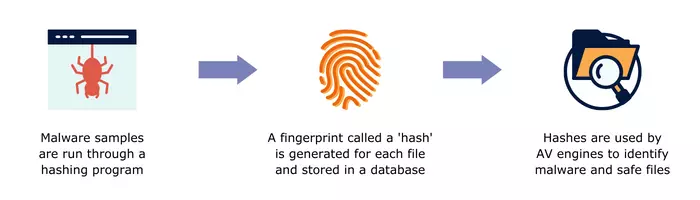
A hash function is an algorithm that takes an arbitrary input of bits of any size and produces a unique, fixed-size output. The output is known as a hash, hash code, hash sum, hash value, checksum, digital fingerprint, or message digest. A hash calculated for a malware file is a malware hash.

The hashing process is mathematically guaranteed to only work in one direction – from a string of bits of varied size to a fixed-size output – and cannot be reversed. And the output’s uniqueness is meant to be absolute, that means no two distinct inputs can generate the same output; modifying only one bit of the input generates a completely different hash sum.

It Takes All Kinds

The most common hash functions are MD5, SHA-1, SHA-256, and SHA-512. Their main purpose in cybersecurity is to generate unique identifiers for their inputs, such as malware files, that can be cataloged, shared or (re)searched with relative ease.

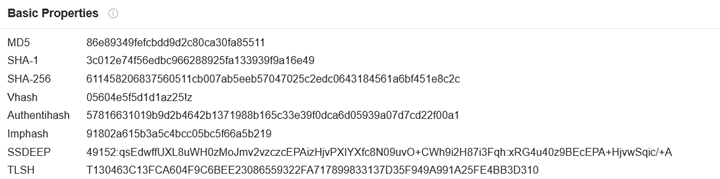
Other types of hash functions are used for granular identification, grouping, comparison, and analysis of malware. For example, fuzzy hashes were developed to identify files that share characteristics or have been modified only slightly. One common type of fuzzy hash is SSDEEP.

Are Hashes Really Secure?

It depends. Some hashes once believed unbreakable are now considered to be insecure. This can mean that it’s possible to reverse, generate a collision (create the same hash value for two different inputs) or otherwise manipulate the algorithm and/or its output.

Of the hashing functions previously mentioned, the MD5 is no longer considered secure. According to some sources, the SHA-1, SHA-256, and SHA-512 functions can also be considered insecure, depending on the intended use.

For protecting data, like passwords, strong hashing algorithms are necessary. A common-sense best practice is to make sure that any hash function you are considering meets the security requirements of your 1) use case and 2) organization/industry.

How are Hashes Used?

Hash functions have many uses in cybersecurity and elsewhere. Their overall most popular uses are in the areas of data confidentiality and integrity as well as authentication and non-repudiation. The following characteristics make them ideal for the job:

1) They are not reversible
2) The output is unique and of fixed length
3) They significantly – exponentially even – reduce the amount of original data they represent.

A few examples of uses that rely heavily on the features above include:

Hash table – A data structure that utilizes hash values to represent large amounts of data or large files. Both the reduction in the amount of data to query and the quick cross-referencing facilitated by unique identifiers allow for rapid data lookup.

File integrity – A hash is computed and then compared with the stored hash of the original data. If the two values match, the data has not been modified.

Malware Hashes and Hash Functions

Password security – User-created passwords are run through a hashing algorithm and the hash is stored instead of the plaintext version. This protects passwords in the event of unauthorized access. Any password entered for logging in is hashed and compared with the stored hash for verification purposes.

Hashes in Cybersecurity

In the cybersecurity industry, hashes are primarily used to identify, share, and group malware samples. One of the first use cases for them was in antivirus (AV) software. AVs use a database of malware hashes as a sort of blocklist. During the scanning process, the blocklist is compared against the hashes calculated for the executable files on the system. A match indicates a malicious file is present.

A drawback to this detection method is that the list of known malware hashes is already huge and grows larger every day. This amount of data can easily overload the storage and processing capacity of personal computers, IDS/IPS and firewalls. A best practice when using blocklists of any kind is to make sure your threat intelligence is fresh, not full of inactive indicators or false positives. Quality over quantity!

As the industry evolved, security tools began to additionally make use of heuristic/behavioral analysis to detect malware. Without this capability, polymorphic malware, for example, would go undetected.

Beyond the AV

Malware hashes have several uses beyond signature-based detection tools. They standardize and simplify the exchange of IoCs (Indicators of Compromise) among researchers. (And we all know that our malware naming conventions are far from standardized!) This list of hashes from a VirusTotal search result probably looks familiar to you:
malware hashes

And just as AV software uses malware hashes to look for infected machines, threat hunters and SOC teams use them for the same purpose. In fact, being able to search for a hash value instead of looking for evidence of the malware itself saves a lot of time. Having quality malware hashes data in a TIP or SIEM to assist with investigations is invaluable.

Researchers utilize hashes to analyze and compare malware, such as with fuzzy hashes that try to find similarities between samples. Machine learning models can use perceptual hash data from screenshots, for example, to learn how to recognize screenshots of web pages that have similar content, such as phishing sites.

Conclusion

While hashes have limitations when used for perimeter-based malware detection, they are still extremely helpful. It’s all about layered security and not ever depending on one tool or type of indicator to protect your network. As for the exchange of IoCs, threat research, and machine learning, hashes have a multitude of applications. Some of these are still new and very promising.

If you want to learn more about hashes, there are many good resources out there. Some articles we encountered during our research are listed below:

  • Calculate Your Own Hashes with CyberChef: https://gchq.github.io/CyberChef/
  • https://blog.jscrambler.com/hashing-algorithms
  • https://resources.infosecinstitute.com/topic/threat-hunting-for-file-hashes-as-an-ioc/
  • https://www.gdatasoftware.com/blog/2021/09/an-overview-of-malware-hashing-algorithms
  • https://www.sentinelone.com/cybersecurity-101/hashing/
  • https://blog.securitybreak.io/fifty-shades-of-malware-hashing-3783d98df59c


Looking for Quality Malware Hashes Data?

Malware Patrol offers the three hashes feeds below. You can request a free evaluation here.

1) Malware Hashes Feed. Includes MD5, SHA-1, and SHA-256 hashes, as well as classification of verified active malware and ransomware samples.

2) Risk Indicators Feed. Composed of a variety of IoCs, including MD5, SHA-1, and SHA-256 hashes, email addresses, cryptocurrency addresses, and CVEs. The curated data in this feed is derived from our network of honeypots as well as trusted third-party sources.

3) Phishing Screenshots & Perceptual Hashes Feed. Malware Patrol collects phishing URLs from various sources – crawlers, emails, spam traps, and more – to ensure coverage of the most current campaigns. We take screenshots of the phishing pages and the corresponding perceptual hashes are calculated. These can later be compared with hashes of other screenshots to determine a match likelihood.

?

MISP Project – A free & robust open source threat intelligence platform

?????

MISP and Malware Patrol logos on a image with a grey and white background used for the misp blog post

The MISP project is a free open source threat intelligence platform (TIP) that stores, analyzes, and shares information about malware.

It is co-financed by the European Union and a wide variety of organizations, including law enforcement agencies, private companies, and academic institutions, rely on MISP.

The platform has several features that make it an invaluable tool. For example, a searchable database of known malware samples allows organizations to find information on specific threats quickly. In addition, MISP includes a variety of other options such as a collection of OSINT feeds, API access, and integration with other security products.

Another reason why MISP is a crucial tool for malware researchers and security professionals is that it allows them to share information about new threats and samples quickly. This helps researchers keep up with the latest threats and allows them to work together to better understand and protect against new attacks.

MISP Threat Sharing Project Features

“Support” refers to the ability of a software or service to integrate with MISP. This is accomplished through an API or by using a MISP-compatible format. Many different types of industry software and services offer support. These include but are not limited to various SIEMs, TIPs, and incident response tools.

MISP modules are expansion modules that can be used to add new functionality to MISP. They are developed by the MISP community and are available for anyone to use. There are currently over 40 MISP modules available! They cover a wide range of topics, such as malware analysis, incident response, and threat intelligence. For example, the platform can use Splunk for log analysis or TheHive for incident response.

For customization purposes, MISP has flexible taxonomies for describing and tagging events. There is also support for exporting data in the MISP format or in STIX/MAEC formats, as well as an advanced correlation engine to identify relationships between indicators. Hierarchical tag inheritance is yet another feature.

To support its mission of enabling the sharing of information, the tool allows the creation of private groups for sensitive information. This is ideal for sharing information about new threats and vulnerabilities within a company so that everyone can be aware and take appropriate action.

pyMISP

The pyMISP project is an open-source toolbox written in Python 3 and serves as the official library for the MISP project. It is designed to support the MISP threat intelligence platform by providing a flexible and powerful platform for ingests, exports, queries, and analyses. The project is led by Alexandre Dulaunoy (@adulau), who is also the main developer of the MISP software.

pyMISP is released under the GNU Affero General Public License v3.0. The toolbox currently contains 19 different tools, each of which performs a specific function related to MISP.

Some of the more popular tools included in pyMISP are:

  • Ingest: This tool allows you to ingest data from a variety of sources, including text files, JSON files, and even generic SQL databases. Export: This tool allows you to export data from MISP in a variety of formats, including CSV, XML, and HTML.
  • Query: This tool allows you to perform simple queries against the data in MISP. For example, you can use this tool to search for all incidents that contain a specific IP address.
  • Analysis: This tool allows you to perform various analyses on the data in MISP. For example, you can use this tool to generate a timeline of all events in MISP.

Training Options

There are many super thorough training videos on YouTube. The official options, linked below, are provided by the team at CIRCL (Computer Incident Response Center Luxembourg), the creators of the platform. A YouTube search will yield even more results for MISP training sessions and usage tips.

Conclusion

Overall, the MISP Threat Sharing project is a powerful and feature-rich threat intelligence platform. The API and impressively long list of current integrations and services make it a super flexible TIP/tool that any team should consider if they have a need for one.

Malware Patrol offers several feeds formatted for MISP, as well as the option to sync with our MISP servers. The feeds available include:

You can request a free evaluation of our MISP services here. If you’re already a customer using MISP, we have a handy configuration guide available.

?

DNS Sinkholes: Detect and Protect

?

Bots don’t sleep, ransomware finds new ways to infiltrate systems and yesterday’s defenses may be ineffective tomorrow. Cybersecurity requires vigilance. But vigilance alone won’t suffice. That’s why threat researchers and enterprise security analysts need effective tools to detect malware indicators and protect systems. Luckily, DNS sinkholes do both.

What’s a DNS Sinkhole?

In the Internet’s vast highway of connections, DNS sinkholes redirect network traffic. They intercept packets attempting to reach a certain address and reroute them. Consequently, both good and bad actors use sinkholes.

In cybersecurity, researchers use their power for good.

For example, remember the Wannacry ransomware attack? It affected more than 200,000 computers in 150 countries. Do you know what stopped its spread? A sinkhole. A security company deployed it. That sinkhole slowed the attack’s progress, giving businesses time to install a patch that inoculated their machines.

To be honest, they had a little help. Wannacry had a built-in fault that left it vulnerable. Its creators hardcoded a single static domain name into the malware. It was supposed to be a kill switch if they wanted to stop its spread. One problem: the static domain was left available for registration. So for less than $11 to register the domain and with the infrastructure and bandwidth to support a massive sinkhole, a cybersecurity researcher on vacation flipped the switch and funneled all that traffic into a waiting abyss.

It bought just enough time to get in front of the spread and contain the threat. Most DNS sinkholes operate a bit differently of course. Administrators design them to find a broad array of threats, not just one.

Using DNS sinkholing, threat researchers capture, monitor and analyze malicious Internet traffic in real time. Certainly one of the most obvious indicators of maliciousness is an attempt to connect to a known botnet command and control (C2) server. When users attempt to connect to an identified C2, a false, controlled IP address is returned and the traffic actually goes to a sinkhole, a server that an administrator controls.

Why Use a Sinkhole?

Once traffic goes to a sinkhole, threat researchers can tell which computers may be infected and notify users. Not only that – seeing how machines communicate with a malicious domain allows threat researchers to craft defenses that counter those tactics, techniques and procedures (TTP).

Then they can share the collected intelligence. This effectively neutralizes certain attack TTPs because over time the defense becomes an industry standard. After that, though every company may not adopt the defense straight away, they now have the ability to do so.

Companies differ, but often the strategies used to attack them don’t. It’s one advantage we’d do well to exploit.

For this reason, white hat sinkhole IP addresses are a useful tool for both reactive and proactive cybersecurity. With the valuable data contained in them, threat researchers can detect potential malware, protect their networks and contribute to the safety of the entire Internet.

How Can You Start Using DNS Sinkholes?

If you want to find DNS sinkholes, there are a few tested methods for identifying them. First, try reviewing the WHOIS nameservers information and SSL certificates. These are probably the two most straight-forward sources. Because of this, you’ll probably find more security companies sinkholing for research purposes.

On other side of the spectrum, you can find instructions for setting up a sinkhole with some basic research. Just make sure that you use a trusted source or software solution. Whichever method you choose, DNS sinkholes are an infosec tool worth acquiring to detect, protect, and anticipate the next threat.

By Tenea D. Johnson

Founder, Progress By Design

?

What is Ransomware?

??


Malware Patrol’s CEO Andre Correa was recently interviewed by Dana Mantilia from Identity Protection Planning. They discussed the basics – and more – about ransomware:

  • What is Ransomware?
  • What should a company do in the case of an attack?
  • Why is paying ransom a bad idea?
  • Why has cryptocurrency became the main payment method for ransom?
  • How do you recover from an attack?

This is a worthwhile watch if you have unanswered questions or want to review what you already know. In the event that your organization suffers (or has suffered) an attack, you will have some difficult decisions to make. The more you can prepare yourself and your team for how to respond, the better your recovery will be.

An attack impacts each organization differently, and now double extortion ransomware has complicated the simplistic “never pay” stance that many in the industry take. These considerations make it important to seek information from a variety of sources. You will need to find the solutions that fit your organization’s situation.

Not surprisingly, we want to emphasize the importance of using threat intelligence to help prevent and detect threats in your environment. Securing your organization is simply easier when you know what you are supposed to be blocking or hunting!

Malware Patrol offers three data feeds that specifically cover this threat: 1) URLs known to be hosting ransomware (or the malware that is used to open access to network for the ransomware install), 2) Command & Control Servers and 3) DGAs, the URLs/domains from which malware and ransomware receive their instructions and/or to which they send stolen data.


?

Best Practices to Protect Against Ransomware

???

Everyone wants to know how to protect against ransomware – 2021 is the year of ransomware! The Colonial Pipeline attack shutdown a major oil distribution line and held it for ransom. Kaseya, a software vendor, was targeted with a $70 million ransom in bitcoin on July 5th(1). Both of these incidents and others are still ongoing, but shouldn’t the real focus be on how to not become the next headline?

The cybersecurity industry is robust and varied with many elaborate platforms and tools that promise to protect against ransomware and everything else. Alluring technology, like machine learning and artificial intelligence, are touted to detect zero-days or other undetecables. Unfortunately, as well intentioned as these tools are, the peak effectiveness of a security program is not attainable without the implementation of some basic best practices. 

Seventy five percent of companies infected with ransomware were running up-to-date endpoint protection(2). This demonstrates that it can be the small innocuous things that result in an intrusion, such as outdated devices connected to the network (2), or human errors. It is these holes and similarly simplistic avenues that basic best practices or the most basic features of your cybersecurity defense system are designed to cover. “Basic” in many ways is a misnomer. These are truly the foundations on which an entire cybersecurity system depends. CISA, the United States Cybersecurity and Infrastructure Security Agency’s, guide to ransomware lists these best practices as(3):

  • Update software and operating systems with the latest patches. Outdated applications and operating systems are the target of most attacks.
  • Never click on links or open attachments in unsolicited emails.
  • Back up data on a regular basis. Keep it on a separate device and store it offline.
  • Follow safe practices when using devices that connect to the Internet:
  • Improve password security(3):
      • Create a strong password.
      • Consider using a password manager.
      • Use multi-factor authentication, if available.
      • Use security questions properly.
      • Create unique accounts for each user per device.
    • Choose secure networks.
    • Keep all of your personal electronic device software current.
    • Be suspicious of unexpected emails.

These guidelines should be implemented by both individuals and corporations. Proper foundational tactics can protect against ransomware and its most common vehicles of delivery, such as phishing. Phishing through texts, messaging, or emails is one of the more common avenues in which ransomware is delivered. As recommended by UC Berkley, if you don’t know the sender, then don’t click (6) and consider adding a few checks to ensure you know the sender for familiar contacts or organizations that hackers may hijack, such as Microsoft or one’s own employer(6).

The bulk of these practices are meant to aid prevention of intrusion, but one step is your insurance against loss if an incident happens: data backups. Ransomware is essentially a hostage situation and there is no guarantee that your data and system will be returned in the condition it was seized in. For organizations, it is critical to have backups when auditing and re-uploading their data once they have recovered from the ransom situation. However, if there is a secure backup, then there is no need to pay the ransom at all.

Once these foundational practices are in place, build upon them with some well-known defense tactics, and add a few less well known ones. These include making sure anti-malware software is always enabled, running real-time scanning(5), and restricting privileges within an organization or network(3). These settings and tools can prevent malware from running or at least limit its capacity to spread. Additional practices recommended by CISA are(3):

  • Restrict users’ permissions to install and run software applications, and apply the principle of “least privilege” to all systems and services[…].
  • Use application allow listing to allow only approved programs to run on a network.
  • Enable strong spam filters to prevent phishing emails from reaching the end users and authenticate inbound email to prevent email spoofing.
  • Scan all incoming and outgoing emails to detect threats and filter executable files from reaching end users.
  • Configure firewalls to block access to known malicious IP addresses.

This second layer of best practices to protect against ransomware can be further strengthened with threat intelligence. Armed with a variety of reputable IoC sources, your security tools will be able to recognize traffic to/from as well as to block access to ransomware and its control infrastructure. For example, Malware Patrol offers a feed of malware & ransomware URLs. Additional feeds include DGAs and C2s, which are domains and URLs/addresses that, once accessed, allow the malware or ransomware to establish contact with its control infrastructure.   

A solid foundation in the basic best practices aids in the prevention of ransomware attacks for individuals and organizations. Cybersecurity is not just one singular thing, but is instead many layers that build and support each other. Ingrain these best practices until they’re a rote memory and utilize the tools that support and emphasize them in order to better support the rest of your cybersecurity system. Hacker attacks and ransomware threats aren’t going away, but by being diligent the undertow and its dangers are avoidable.

References

  1. https://www.cnn.com/2021/07/06/tech/kaseya-ransomware-what-we-know/index.html
  2. https://purplesec.us/cyber-security-trends-2021/#Ransomware
  3. https://cisa.gov/ransomware
  4. https://us-cert.cisa.gov/ncas/tips/ST04-003
  5. https://security.berkeley.edu/resources/best-practices-how-to-articles/top-10-secure-computing-tips
  6. https://www.techrepublic.com/article/new-phishing-attack-hijacks-email-conversations-how-companies-can-protect-employees/

Shannon Shell

Freelance Writer

?