New OSINT Feeds: High Risk IPs – Risk Indicators – Tor Exit Nodes

?????

OSINT feed

Sharing is Caring

To our industry’s credit, there are many good OSINT feeds and data sharing platforms. Even better, they are relatively easy to find. A simple Google search for open source intelligence (OSINT) threat feeds or open source cybersecurity tools will yield many, many results. This is really a testament to the goodwill and collaborative spirit of the cybersecurity community.

Some examples of data sharing options include DHS CISA AIS, AlienVault OTX, and Abuse.ch, just to name a few. High quality open source security tools (TIP, SIEM, SOAR), such as MISP, are also readily available to help your organization utilize intelligence of all kinds.

Avoid Analysis Paralysis

As usual, there is a however to this good news: the number of available resources can be overwhelming. When faced with so many options, it can be difficult, or time consuming at the very least, to select, evaluate, and implement free intelligence and tools in your organization. Without some parameters or pre-defined goals, your research efforts may fall short.

If you are about to embark on this journey, we would like to offer a few suggestions about how to structure and organize your OSINT search process:

1) Determine your organization’s intelligence needs and priorities.

    • Review current goals or roadmaps related to threat intelligence to clarify and prioritize your needs.
    • Ask your security team – and other relevant stakeholders – for their input:
      • What are your data gaps? For example, what caused your last incident, and could it have been prevented with some additional type of data?
      • Do you know the tactics, techniques and procedures (TTPs) of threat actors targeting your organization’s industry and could OSINT help prepare for these specific kinds of attacks?
      • Is there a paid intelligence resource or tool you are unable to afford but really want? Maybe it is worth looking for a free/open source alternative?
      • Also consider other topics specific to your organization, industry, security environment, geopolitical events, and so on

2) Research and compile a list of potential sources.

    • Use one of the industry’s go-to OSINT resources as a starting point.
    • Ask around – nothing beats a firsthand recommendation.
    • Search for curated lists of OSINT feeds/sources. (Be mindful of the age and potential bias of the information source.) We found these helpful articles during our research: SOCRadar, Spiderfoot, Sunny Valley Networks and SENKI. GitHub rarely disappoints.

3) Evaluate and rate the sources for final decision making.

    • Criteria to consider:
      • Data quality – Are you familiar with the organization that generates it? Or how a crowd-sourced data community is managed, members vetted? Is the data rated or otherwise confirmed by group members in some way? How is it aged?
      • Update frequency (if applicable) – Hourly, Daily, Monthly, Other?
      • Coverage – Geography? Market vertical?
      • Aggregation/Efficiency – Does the provider aggregate multiple sources into one?
      • Ease of integration/retrieval – Do your tools ingest data in the formats provided? Can collection be easily automated or otherwise added to your team’s tasks without being burdensome?
      • Context – Does the data include context on the incident or campaign?
      • Licensing – Does it allow for your intended use of the data? Open source does not automatically mean the data can be used freely for commercial purposes.
    • Check for overlap with your current resources to prevent overloading your tools with repetitious data. For example, MISP has a Feed overlap analysis matrix. Other tools offer similar functionality.
    • Consider the reputation of the provider and any other applicable factors from your research to determine the confidence level you feel comfortable applying to the data:
      • High confidence – Decisions and alerts will be based on this data source
      • Medium confidence – Indicator must be confirmed by another source before acted upon
      • Low or N/A confidence – Not used for alerts or blocking, but useful for research and as a confirmation of an indicator’s maliciousness
    • Use all the above information to make a final list. Review and decide.

4) Decide which tool(s) and/or process(es) will use the OSINT feed or unstructured data and for what purpose. (Use details from step 1 to help with this.)

    • Integrate the threat data into your security tool(s) and processes. Set up automatic downloads and/or assign manual tasks.
    • Update documentation/SOPs to include your new resources.
    • Inform security teams and provide any necessary training on how to use/interpret the data.
    • Schedule a review (30, 60, 90 days) to evaluate the usefulness and quality of the data.
    • Wash, rinse, repeat to keep expanding your OSINT at regular intervals.

OSINT Feeds from Malware Patrol

If acquiring open source intelligence is a goal for your organization, we invite you to check out Malware Patrol’s free OSINT feeds. The curated data is derived from our internal research well as trusted third-party sources.

  • High Risk IPs: Addresses involved in a range of malicious activities, such as spam, malware distribution, botnets, and command-and-control communications.
  • Risk Indicators: A variety of threat related IoCs, including: MD5, SHA1, and SHA256 hashes, email addresses, cryptocurrency addresses, and CVEs.
  • Tor Exit Nodes: Addresses of active Tor exit nodes as reported by the Tor Project. Frequently involved in malicious activities, it is advisable to monitor, if not block, traffic from these IPs.

Here’s how Malware Patrol does OSINT:

  • We enrich the feeds with decision-enhancing context such as the associated malware family, threat actor, article links, and any other available metadata.
  • Entries are aged and removed at regular intervals to make sure the data stays fresh.
  • Our team manages the data quality and sources closely.

To find out more about our OSINT feeds, visit our Enterprise page.


OSINT feed
?

Malware Hashes and Hash Functions

???

An Introduction to Malware Hashes and Hash Functions

Malware hashes are found everywhere in our industry. And for a good reason. They very efficiently help identify malware samples and standardize the exchange of information among researchers, to name a couple of use cases.

The topic of hash functions is an enormous and complex one. There are dozens of them, if not more, with significant variations in base computation methods, applications, security, and outputs. So, for time and sanity’s sake, we will only discuss hashes in the context of information security and cybersecurity.

What is a Hash Function?

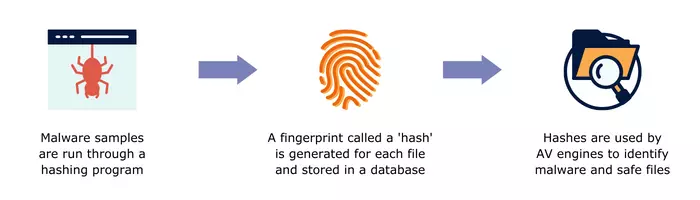
A hash function is an algorithm that takes an arbitrary input of bits of any size and produces a unique, fixed-size output. The output is known as a hash, hash code, hash sum, hash value, checksum, digital fingerprint, or message digest. A hash calculated for a malware file is a malware hash.

The hashing process is mathematically guaranteed to only work in one direction – from a string of bits of varied size to a fixed-size output – and cannot be reversed. And the output’s uniqueness is meant to be absolute, that means no two distinct inputs can generate the same output; modifying only one bit of the input generates a completely different hash sum.

It Takes All Kinds

The most common hash functions are MD5, SHA-1, SHA-256, and SHA-512. Their main purpose in cybersecurity is to generate unique identifiers for their inputs, such as malware files, that can be cataloged, shared or (re)searched with relative ease.

Other types of hash functions are used for granular identification, grouping, comparison, and analysis of malware. For example, fuzzy hashes were developed to identify files that share characteristics or have been modified only slightly. One common type of fuzzy hash is SSDEEP.

Are Hashes Really Secure?

It depends. Some hashes once believed unbreakable are now considered to be insecure. This can mean that it’s possible to reverse, generate a collision (create the same hash value for two different inputs) or otherwise manipulate the algorithm and/or its output.

Of the hashing functions previously mentioned, the MD5 is no longer considered secure. According to some sources, the SHA-1, SHA-256, and SHA-512 functions can also be considered insecure, depending on the intended use.

For protecting data, like passwords, strong hashing algorithms are necessary. A common-sense best practice is to make sure that any hash function you are considering meets the security requirements of your 1) use case and 2) organization/industry.

How are Hashes Used?

Hash functions have many uses in cybersecurity and elsewhere. Their overall most popular uses are in the areas of data confidentiality and integrity as well as authentication and non-repudiation. The following characteristics make them ideal for the job:

1) They are not reversible
2) The output is unique and of fixed length
3) They significantly – exponentially even – reduce the amount of original data they represent.

A few examples of uses that rely heavily on the features above include:

Hash table – A data structure that utilizes hash values to represent large amounts of data or large files. Both the reduction in the amount of data to query and the quick cross-referencing facilitated by unique identifiers allow for rapid data lookup.

File integrity – A hash is computed and then compared with the stored hash of the original data. If the two values match, the data has not been modified.

Malware Hashes and Hash Functions

Password security – User-created passwords are run through a hashing algorithm and the hash is stored instead of the plaintext version. This protects passwords in the event of unauthorized access. Any password entered for logging in is hashed and compared with the stored hash for verification purposes.

Hashes in Cybersecurity

In the cybersecurity industry, hashes are primarily used to identify, share, and group malware samples. One of the first use cases for them was in antivirus (AV) software. AVs use a database of malware hashes as a sort of blocklist. During the scanning process, the blocklist is compared against the hashes calculated for the executable files on the system. A match indicates a malicious file is present.

A drawback to this detection method is that the list of known malware hashes is already huge and grows larger every day. This amount of data can easily overload the storage and processing capacity of personal computers, IDS/IPS and firewalls. A best practice when using blocklists of any kind is to make sure your threat intelligence is fresh, not full of inactive indicators or false positives. Quality over quantity!

As the industry evolved, security tools began to additionally make use of heuristic/behavioral analysis to detect malware. Without this capability, polymorphic malware, for example, would go undetected.

Beyond the AV

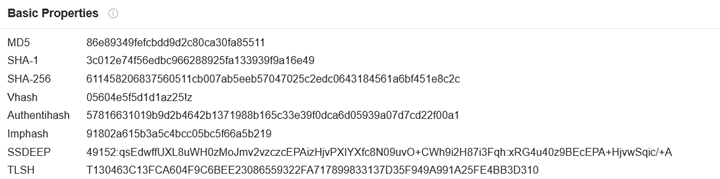
Malware hashes have several uses beyond signature-based detection tools. They standardize and simplify the exchange of IoCs (Indicators of Compromise) among researchers. (And we all know that our malware naming conventions are far from standardized!) This list of hashes from a VirusTotal search result probably looks familiar to you:

malware hashes

And just as AV software uses malware hashes to look for infected machines, threat hunters and SOC teams use them for the same purpose. In fact, being able to search for a hash value instead of looking for evidence of the malware itself saves a lot of time. Having quality malware hashes data in a TIP or SIEM to assist with investigations is invaluable.

Researchers utilize hashes to analyze and compare malware, such as with fuzzy hashes that try to find similarities between samples. Machine learning models can use perceptual hash data from screenshots, for example, to learn how to recognize screenshots of web pages that have similar content, such as phishing sites.

Conclusion

While hashes have limitations when used for perimeter-based malware detection, they are still extremely helpful. It’s all about layered security and not ever depending on one tool or type of indicator to protect your network. As for the exchange of IoCs, threat research, and machine learning, hashes have a multitude of applications. Some of these are still new and very promising.

If you want to learn more about hashes, there are many good resources out there. Some articles we encountered during our research are listed below:

  • Calculate Your Own Hashes with CyberChef: https://gchq.github.io/CyberChef/
  • https://blog.jscrambler.com/hashing-algorithms
  • https://resources.infosecinstitute.com/topic/threat-hunting-for-file-hashes-as-an-ioc/
  • https://www.gdatasoftware.com/blog/2021/09/an-overview-of-malware-hashing-algorithms
  • https://www.sentinelone.com/cybersecurity-101/hashing/
  • https://blog.securitybreak.io/fifty-shades-of-malware-hashing-3783d98df59c


Looking for Quality Malware Hashes Data?

Malware Patrol offers the three hashes feeds below. You can request a free evaluation here.

1) Malware Hashes Feed. Includes MD5, SHA-1, and SHA-256 hashes, as well as classification of verified active malware and ransomware samples.

2) Risk Indicators Feed. Composed of a variety of IoCs, including MD5, SHA-1, and SHA-256 hashes, email addresses, cryptocurrency addresses, and CVEs. The curated data in this feed is derived from our network of honeypots as well as trusted third-party sources.

3) Phishing Screenshots & Perceptual Hashes Feed. Malware Patrol collects phishing URLs from various sources – crawlers, emails, spam traps, and more – to ensure coverage of the most current campaigns. We take screenshots of the phishing pages and the corresponding perceptual hashes are calculated. These can later be compared with hashes of other screenshots to determine a match likelihood.

?

MISP Project – A free & robust open source threat intelligence platform

?????

MISP and Malware Patrol logos on a image with a grey and white background used for the misp blog post

The MISP project is a free open source threat intelligence platform (TIP) that stores, analyzes, and shares information about malware.

It is co-financed by the European Union and a wide variety of organizations, including law enforcement agencies, private companies, and academic institutions, rely on MISP.

The platform has several features that make it an invaluable tool. For example, a searchable database of known malware samples allows organizations to find information on specific threats quickly. In addition, MISP includes a variety of other options such as a collection of OSINT feeds, API access, and integration with other security products.

Another reason why MISP is a crucial tool for malware researchers and security professionals is that it allows them to share information about new threats and samples quickly. This helps researchers keep up with the latest threats and allows them to work together to better understand and protect against new attacks.

MISP Threat Sharing Project Features

“Support” refers to the ability of a software or service to integrate with MISP. This is accomplished through an API or by using a MISP-compatible format. Many different types of industry software and services offer support. These include but are not limited to various SIEMs, TIPs, and incident response tools.

MISP modules are expansion modules that can be used to add new functionality to MISP. They are developed by the MISP community and are available for anyone to use. There are currently over 40 MISP modules available! They cover a wide range of topics, such as malware analysis, incident response, and threat intelligence. For example, the platform can use Splunk for log analysis or TheHive for incident response.

For customization purposes, MISP has flexible taxonomies for describing and tagging events. There is also support for exporting data in the MISP format or in STIX/MAEC formats, as well as an advanced correlation engine to identify relationships between indicators. Hierarchical tag inheritance is yet another feature.

To support its mission of enabling the sharing of information, the tool allows the creation of private groups for sensitive information. This is ideal for sharing information about new threats and vulnerabilities within a company so that everyone can be aware and take appropriate action.

pyMISP

The pyMISP project is an open-source toolbox written in Python 3 and serves as the official library for the MISP project. It is designed to support the MISP threat intelligence platform by providing a flexible and powerful platform for ingests, exports, queries, and analyses. The project is led by Alexandre Dulaunoy (@adulau), who is also the main developer of the MISP software.

pyMISP is released under the GNU Affero General Public License v3.0. The toolbox currently contains 19 different tools, each of which performs a specific function related to MISP.

Some of the more popular tools included in pyMISP are:

  • Ingest: This tool allows you to ingest data from a variety of sources, including text files, JSON files, and even generic SQL databases. Export: This tool allows you to export data from MISP in a variety of formats, including CSV, XML, and HTML.
  • Query: This tool allows you to perform simple queries against the data in MISP. For example, you can use this tool to search for all incidents that contain a specific IP address.
  • Analysis: This tool allows you to perform various analyses on the data in MISP. For example, you can use this tool to generate a timeline of all events in MISP.

Training Options

There are many super thorough training videos on YouTube. The official options, linked below, are provided by the team at CIRCL (Computer Incident Response Center Luxembourg), the creators of the platform. A YouTube search will yield even more results for MISP training sessions and usage tips.

Conclusion

Overall, the MISP Threat Sharing project is a powerful and feature-rich threat intelligence platform. The API and impressively long list of current integrations and services make it a super flexible TIP/tool that any team should consider if they have a need for one.

Malware Patrol offers several feeds formatted for MISP, as well as the option to sync with our MISP servers. The feeds available include:

You can request a free evaluation of our MISP services here. If you’re already a customer using MISP, we have a handy configuration guide available.

?

DNS Sinkholes: Detect and Protect

?

Bots don’t sleep, ransomware finds new ways to infiltrate systems and yesterday’s defenses may be ineffective tomorrow. Cybersecurity requires vigilance. But vigilance alone won’t suffice. That’s why threat researchers and enterprise security analysts need effective tools to detect malware indicators and protect systems. Luckily, DNS sinkholes do both.

What’s a DNS Sinkhole?

In the Internet’s vast highway of connections, DNS sinkholes redirect network traffic. They intercept packets attempting to reach a certain address and reroute them. Consequently, both good and bad actors use sinkholes.

In cybersecurity, researchers use their power for good.

For example, remember the Wannacry ransomware attack? It affected more than 200,000 computers in 150 countries. Do you know what stopped its spread? A sinkhole. A security company deployed it. That sinkhole slowed the attack’s progress, giving businesses time to install a patch that inoculated their machines.

To be honest, they had a little help. Wannacry had a built-in fault that left it vulnerable. Its creators hardcoded a single static domain name into the malware. It was supposed to be a kill switch if they wanted to stop its spread. One problem: the static domain was left available for registration. So for less than $11 to register the domain and with the infrastructure and bandwidth to support a massive sinkhole, a cybersecurity researcher on vacation flipped the switch and funneled all that traffic into a waiting abyss.

It bought just enough time to get in front of the spread and contain the threat. Most DNS sinkholes operate a bit differently of course. Administrators design them to find a broad array of threats, not just one.

Using DNS sinkholing, threat researchers capture, monitor and analyze malicious Internet traffic in real time. Certainly one of the most obvious indicators of maliciousness is an attempt to connect to a known botnet command and control (C2) server. When users attempt to connect to an identified C2, a false, controlled IP address is returned and the traffic actually goes to a sinkhole, a server that an administrator controls.

Why Use a Sinkhole?

Once traffic goes to a sinkhole, threat researchers can tell which computers may be infected and notify users. Not only that – seeing how machines communicate with a malicious domain allows threat researchers to craft defenses that counter those tactics, techniques and procedures (TTP).

Then they can share the collected intelligence. This effectively neutralizes certain attack TTPs because over time the defense becomes an industry standard. After that, though every company may not adopt the defense straight away, they now have the ability to do so.

Companies differ, but often the strategies used to attack them don’t. It’s one advantage we’d do well to exploit.

For this reason, white hat sinkhole IP addresses are a useful tool for both reactive and proactive cybersecurity. With the valuable data contained in them, threat researchers can detect potential malware, protect their networks and contribute to the safety of the entire Internet.

How Can You Start Using DNS Sinkholes?

If you want to find DNS sinkholes, there are a few tested methods for identifying them. First, try reviewing the WHOIS nameservers information and SSL certificates. These are probably the two most straight-forward sources. Because of this, you’ll probably find more security companies sinkholing for research purposes.

On other side of the spectrum, you can find instructions for setting up a sinkhole with some basic research. Just make sure that you use a trusted source or software solution. Whichever method you choose, DNS sinkholes are an infosec tool worth acquiring to detect, protect, and anticipate the next threat.

By Tenea D. Johnson

Founder, Progress By Design

?

What is Ransomware?

??


Malware Patrol’s CEO Andre Correa was recently interviewed by Dana Mantilia from Identity Protection Planning. They discussed the basics – and more – about ransomware:

  • What is Ransomware?
  • What should a company do in the case of an attack?
  • Why is paying ransom a bad idea?
  • Why has cryptocurrency became the main payment method for ransom?
  • How do you recover from an attack?

This is a worthwhile watch if you have unanswered questions or want to review what you already know. In the event that your organization suffers (or has suffered) an attack, you will have some difficult decisions to make. The more you can prepare yourself and your team for how to respond, the better your recovery will be.

An attack impacts each organization differently, and now double extortion ransomware has complicated the simplistic “never pay” stance that many in the industry take. These considerations make it important to seek information from a variety of sources. You will need to find the solutions that fit your organization’s situation.

Not surprisingly, we want to emphasize the importance of using threat intelligence to help prevent and detect threats in your environment. Securing your organization is simply easier when you know what you are supposed to be blocking or hunting!

Malware Patrol offers three data feeds that specifically cover this threat: 1) URLs known to be hosting ransomware (or the malware that is used to open access to network for the ransomware install), 2) Command & Control Servers and 3) DGAs, the URLs/domains from which malware and ransomware receive their instructions and/or to which they send stolen data.


?

Best Practices to Protect Against Ransomware

???

Everyone wants to know how to protect against ransomware – 2021 is the year of ransomware! The Colonial Pipeline attack shutdown a major oil distribution line and held it for ransom. Kaseya, a software vendor, was targeted with a $70 million ransom in bitcoin on July 5th(1). Both of these incidents and others are still ongoing, but shouldn’t the real focus be on how to not become the next headline?

The cybersecurity industry is robust and varied with many elaborate platforms and tools that promise to protect against ransomware and everything else. Alluring technology, like machine learning and artificial intelligence, are touted to detect zero-days or other undetecables. Unfortunately, as well intentioned as these tools are, the peak effectiveness of a security program is not attainable without the implementation of some basic best practices. 

Seventy five percent of companies infected with ransomware were running up-to-date endpoint protection(2). This demonstrates that it can be the small innocuous things that result in an intrusion, such as outdated devices connected to the network (2), or human errors. It is these holes and similarly simplistic avenues that basic best practices or the most basic features of your cybersecurity defense system are designed to cover. “Basic” in many ways is a misnomer. These are truly the foundations on which an entire cybersecurity system depends. CISA, the United States Cybersecurity and Infrastructure Security Agency’s, guide to ransomware lists these best practices as(3):

  • Update software and operating systems with the latest patches. Outdated applications and operating systems are the target of most attacks.
  • Never click on links or open attachments in unsolicited emails.
  • Back up data on a regular basis. Keep it on a separate device and store it offline.
  • Follow safe practices when using devices that connect to the Internet:
  • Improve password security(3):
      • Create a strong password.
      • Consider using a password manager.
      • Use multi-factor authentication, if available.
      • Use security questions properly.
      • Create unique accounts for each user per device.
    • Choose secure networks.
    • Keep all of your personal electronic device software current.
    • Be suspicious of unexpected emails.

These guidelines should be implemented by both individuals and corporations. Proper foundational tactics can protect against ransomware and its most common vehicles of delivery, such as phishing. Phishing through texts, messaging, or emails is one of the more common avenues in which ransomware is delivered. As recommended by UC Berkley, if you don’t know the sender, then don’t click (6) and consider adding a few checks to ensure you know the sender for familiar contacts or organizations that hackers may hijack, such as Microsoft or one’s own employer(6).

The bulk of these practices are meant to aid prevention of intrusion, but one step is your insurance against loss if an incident happens: data backups. Ransomware is essentially a hostage situation and there is no guarantee that your data and system will be returned in the condition it was seized in. For organizations, it is critical to have backups when auditing and re-uploading their data once they have recovered from the ransom situation. However, if there is a secure backup, then there is no need to pay the ransom at all.

Once these foundational practices are in place, build upon them with some well-known defense tactics, and add a few less well known ones. These include making sure anti-malware software is always enabled, running real-time scanning(5), and restricting privileges within an organization or network(3). These settings and tools can prevent malware from running or at least limit its capacity to spread. Additional practices recommended by CISA are(3):

  • Restrict users’ permissions to install and run software applications, and apply the principle of “least privilege” to all systems and services[…].
  • Use application allow listing to allow only approved programs to run on a network.
  • Enable strong spam filters to prevent phishing emails from reaching the end users and authenticate inbound email to prevent email spoofing.
  • Scan all incoming and outgoing emails to detect threats and filter executable files from reaching end users.
  • Configure firewalls to block access to known malicious IP addresses.

This second layer of best practices to protect against ransomware can be further strengthened with threat intelligence. Armed with a variety of reputable IoC sources, your security tools will be able to recognize traffic to/from as well as to block access to ransomware and its control infrastructure. For example, Malware Patrol offers a feed of malware & ransomware URLs. Additional feeds include DGAs and C2s, which are domains and URLs/addresses that, once accessed, allow the malware or ransomware to establish contact with its control infrastructure.   

A solid foundation in the basic best practices aids in the prevention of ransomware attacks for individuals and organizations. Cybersecurity is not just one singular thing, but is instead many layers that build and support each other. Ingrain these best practices until they’re a rote memory and utilize the tools that support and emphasize them in order to better support the rest of your cybersecurity system. Hacker attacks and ransomware threats aren’t going away, but by being diligent the undertow and its dangers are avoidable.

References

  1. https://www.cnn.com/2021/07/06/tech/kaseya-ransomware-what-we-know/index.html
  2. https://purplesec.us/cyber-security-trends-2021/#Ransomware
  3. https://cisa.gov/ransomware
  4. https://us-cert.cisa.gov/ncas/tips/ST04-003
  5. https://security.berkeley.edu/resources/best-practices-how-to-articles/top-10-secure-computing-tips
  6. https://www.techrepublic.com/article/new-phishing-attack-hijacks-email-conversations-how-companies-can-protect-employees/

Shannon Shell

Freelance Writer

?

DoH! Not so great to the Enterprise

?

A illustrated image of Internet DoH Border Control by Patrick Taylor. The image contains a toll booth with three booths, The toll booths are labeled Cloudflare, Google, and Firefox.

Internet DoH Border Control by Patrick Taylor.

What Is DNS over HTTPS (DoH) and Why It Matters for Security

DoH, or DNS over HTTPS (RFC 8484), is a relatively new protocol that provides increased privacy and security. It does this by encrypting DNS queries and responses, which prevents eavesdropping and man-in-the-middle attacks. Instead of using a regular DNS resolver, queries are encrypted and sent to a DoH-enabled server, Â making them indistinct from web traffic.

Sounds great in theory. Encryption = greater security? Not so fast there.

Pre-DoH, DNS servers were configured at the operating system level. Home users usually trust their ISPs to handle name resolutions and enterprises often run their own internal servers. However, with DoH, servers are configured at the application level – which bypasses the operating system settings.

By circumventing the operating system’s DNS configuration, DoH becomes a big headache for tech support, system administrators, and, most importantly, enterprises that need to control and audit DNS activities for protection or regulatory reasons.

There’s a very interesting Internet Draft that explains in more detail the technical and regulatory challenges presented by DoH: DNS over HTTPS (DoH) Considerations for Operator Networks (5)

Can you afford for your security settings to be bypassed?

DNS firewalls and auditing are easy and popular ways to protect endpoints, apply parent control and detect compromised systems. DoH bypasses the existing security infrastructure and policies, including hardware, software (such as firewalls, AD policies, intrusion detection systems, etc.), training, and resource management. Enterprises have invested A LOT of time and money in all of these.

While DoH is great in theory, organizations will run into all sorts of technical, policy and regulatory issues with its use.

  • Malware is likely to crop up to exploit this new technology avoiding security mechanisms to reach its command and control systems or drop zones. In fact, Godlua was discovered in July 2019 already doing so (1)
  • DNS Firewalls become ineffective. Traffic cannot be filtered at the DNS level, which means bypassing local policies and, for example, allowing employees to access social media or other prohibited resources at work.
  • Regulations like GDPR are impacted as DoH servers may be operated in a jurisdiction distinct from its users. And DNS queries and IP addresses considered PII in some jurisdictions, and therefore subject to data protection and retention regulations, may not be treated the same way at the physical location of the DoH server
  • Split DNS scenarios, where distinct responses are provided depending on the requester location (internal or external enterprise networks, for example), aren’t possible anymore
  • Private/internal DNS names may be leaked
  • Incident response and threat hunting become far more complex
  • Tech support troubleshooting changes significantly as now applications and the operating system use distinct DNS resolvers
  • Network operators won’t be able to perform DNS blocking and filtering to handle take down notices or comply with court orders
  • Access control lists based on threat intelligence data feeds can be circumvented
  • DNS traffic can’t be audited
  • Parental controls are bypassed
  • CDNs that rely on DNS to direct traffic to cache nodes are no longer able to use the same technique
  • Performance may be impacted by TLS setup times and larger RTTs as queries are sent to servers outside of the enterprise or ISP network (3)(4)

And if all that’s not enough to be wary of DoH, consider this: DoH service providers know IP addresses and DNS queries. And it is unclear how this data can be used by them.  Also, there are only so many DoH providers these days, which concentrates the control over DNS responses in only a few companies. That is dangerous and the opposite of what DNS should be – a hierarchical and decentralized system. It is a threat to Net Neutrality. Recently, we wrote about the benefits of using Malware Patrol over free DNS protection services – the same goes with DoH.

A cartoon image of Homer Simpson in front of a computer monitor with a word bubble that says DOH
Even Mozilla, who announced that DoH will be turned on by default on Firefox, knows that it isn’t a good solution for everyone:

While we would like to encourage everyone to use DoH, we also recognize that there are a few circumstances in which DoH can be undesirable (…) (2)


What’s the best way to keep enterprise systems secure from DoH?

Instead of trying to roll out DoH configuration and lock down all your systems, it’s easier to supply your firewall and/or IDS with an up-to-date feed of active DoH servers. This protects the investment already made in security mechanisms, policies and procedures.

This is why Malware Patrol has created a data feed of DoH resolvers that our customers can use to prevent access, ensuring their carefully configured and security-compliant environments remain under their control.

While DoH sounds like a good way to remain private while accessing the Internet, it’s best left to people to implement in their homes. For enterprises, it’s simply not a tenable privacy solution at this time.

  1. https://www.zdnet.com/article/first-ever-malware-strain-spotted-abusing-new-doh-dns-over-https-protocol/
  2. ttps://support.mozilla.org/en-US/kb/configuring-networks-disable-dns-over-https
  3. https://www.samknows.com/blog/dns-over-https-performance
  4. https://arxiv.org/abs/1907.08089
  5. https://www.ietf.org/archive/id/draft-doh-reid-operator-00.txt

Andre Correa

CEO, Malware Patrol

?

Newly Registered Domains Related to COVID-19

?

The current outbreak of the COVID-19 created a perfect scenario for all sorts of scammers to monetize through fear, false promises and fraud. Since the beginning of March, tens of thousands of new domains have been registered using the terms “corona”, ‘covid’, ‘epidemic’, ‘pandemic’ and ‘wuhan’.

While some of these are legitimate – and some still point to parking pages – it is fair to assume that many are to be used for malicious purposes. In general, newly registered domains should be approached with caution, and under the current circumstances we should be even more vigilant.

A Coronavirus COVID-19 Suspicious Domains image in the Coronavirus Malware Domains Threat Awareness and Prevention blog postOur team compiled a list of domains containing keywords related to the global pandemic from our Newly Registered Domains feed that can be used to protect your family, employees and customers. The list is based solely on the timeframe and the terms used to register the domains, no other assumptions are made. However, if used with caution, we believe it can help to keep people from falling for scams and to prevent the dissemination of misinformation.


The information is provided as-is, with no warranties and free for any use. We will continue to update these feeds likely in a daily basis, so feel free to automate your downloads using the links below:

For information about other online coronavirus scams, check out these articles:

Coronavirus Scam Alert: Watch Out For These Risky COVID-19 Websites And Emails (Forbes)

Battling online coronavirus scams with facts (Malwarebytes)

Malicious coronavirus map hides AZORult info-stealing malware (SC Magazine)

Coronavirus Used in Spam, Malware, and Malicious Domains (TrendMicro)

?

Threat Intelligence: Essential For Your Cyber Defenses

???

Cyber risk is growing while confidence in internal defense resilience declining. According to Microsoft’s 2019 Global Cyber Risk Perception Survey, cyber security is a top 5 business concern for 79% of companies globally (and the top risk for 22% surveyed).

Threat intelligence (TI) is a critical component of your cybersecurity program, the defenses that mitigate cyber risk and help avoid potentially damaging incidents. For smaller businesses, this may be managed by an MSSP, but for larger enterprises, custom TI and management is a must.

What is threat intelligence?

Threat intelligence is, at its core, a collection of tagged and augmented data that can identify potential threats such as malware, ransomware, phishing attempts, botnets, cryptominers, etc. These are databased, monitored and contextually-enriched with relevant data such as IPs, URLs, system vulnerabilities targeted, implications of attack, and patterns of behaviour.

Armed with this information, your organization is able to detect incoming potential threats, set alerts and blocking, as well as engage in threat hunting activities. With a clever solution, TI is integrated with automated processes and machine learning, so analysts spend less time doing manual configuration and more time developing advanced analysis of incoming data and determining new undocumented threats. Data from external sources must seamlessly integrate into your security platforms and tools. If you can’t use it in an automated fashion, it will not likely be very helpful to your efforts.

In The Evolution of Cyber Threat Intelligence (CTI): 2019 SANS CTI Survey, 81% of respondents indicated that CTI had improved their security and response.

Why do organizations need threat intelligence?

Every day there are new threats released into the wild. Some may be obvious and/or simple to defeat; perhaps the ‘spray and pray’ type designed to impact personal data and systems which are easily detected by current organizational firewalls and network security mechanisms. Others can pose serious threats to organizational systems and data, and may even be directly targeting a particular industry, or worse still, your business itself.

Your organization needs real-time, accurate TI to give it the best chance at deflecting attacks.

Threat intelligence can help:

● Identify new threats targeting your business or industry

● Engage in threat hunting activities

● Decrease incident response time

● Prevent access to malicious resources on the Internet

● Avoid penalties and reputational losses from data exfiltration and breaches

● Identify system vulnerabilities

● Identify compromised systems

● Reduce unplanned down times

What do organizations do with threat intelligence?

TI is highly useful for cyber incident response. As per SANS Incident Handler’s Handbook, this process involves planning, identification, containment, eradication, recovery, and lessons learned.

It is also used at the identification and containment stages; incoming threats are identified, prioritized according to determined level of threat, then contained as necessary. Threats that do slip through the system can be shared with the wider community during lessons learned to keep everyone’s business healthy.

A well-functioning TIP / SIEM / SOAR and security team are both essential to ensuring threat intelligence is useful, timely, and prevents incidents. Alone, it is just one part of the process – and is only as useful as the infrastructure supporting it. It should easily integrate into your current SIEM and/or other platforms to save your security professionals’ time building out scripts to ingest data feeds.

Threat intelligence types and streams

From the SANS survey, there are four main types of threat intelligence:

● Indicators of Compromise a.k.a. IOCs (e.g. URLs, command & control centers, IP addresses, newly registered domains, etc)

● Threat behaviors, tactics, and procedures

● Digital footprint

● Strategic analysis of adversary

There are also a number of streams through which we can gather TI:

● Feeds from threat intelligence vendors

● Internally gathered information

● Community group feeds (ISACs, for example)

● Free feeds from security vendors

● Media reports

● Open source (or non-commercial) feeds

While everyone loves a freebie, open source and free feeds aren’t usually the best route to go down. The information they provide may be outdated, duplicated and/or need filtering and reformatting. Threat intelligence vendors such as Malware Patrol continuously process threat intelligence data drawn from internal and external sources to ensure it’s up-to-date, vetted, well-formatted, contextualized and enriched, before releasing it to customers.

Malware Patrol has been collecting threat data for over 15 years. Contact us to request a free evaluation of our services and to learn how our feeds and packages can be tailored to your business requirements.

Andre Correa

CEO, Malware Patrol

?

Tips for Establishing Your Security Program

?

(And How the Cyber Insurance Industry May Help You for Free)


I won’t keep you waiting. Before you get too excited about that free assist from the cyber insurance industry, let me be clear: it won’t, directly. But that’s no problem. Resourcefulness benefits any business, and the cyber insurance industry will soon provide a new resource.

Marsh & McLennan is launching a consumer ratings system for cybersecurity defenses. It will review and rate software and cybersecurity services—and starting in June 2019 those ratings will be available to the public.

So even if you’re in the 27% of US firms that have no plans of getting cyber insurance you can still benefit from the industry’s due diligence.

There’s no word yet on how the platform will maintain impartiality or the underlying methodology so for the clearest consideration, I’d recommend cross-referencing the ratings against professional reviews.

But isn’t this just a new tactic to differentiate themselves in the market/make money? Sure; in fact if your company has cyber insurance with one of the participating insurers you may become eligible for special “terms and conditions” when you use a product that those insurers consider effective (a “Cyber Catalyst” in their parlance). Clearly this is a business and not a philanthropic endeavor. But that doesn’t mean you can’t use it to your advantage.

Designing an effective security program will take research, diligence and perhaps more ingenuity than you might expect. And cyber insurance companies have a vested interest in keeping their payouts down. If their experience with the aftermath of major breaches and associated product insights inform your decisions, all the better.

One further caveat: cybersecurity companies will have to submit their wares for consideration, and with thousands of companies worldwide quite a few will choose not to submit.

Don’t miss out on those that choose not to participate.

How do you choose other effective cybersecurity measures?


Coordination, Coordination, Coordination


Think approach, rather than product. Once you have the approach, you can choose the appropriate product. Prioritize it. Creating a cohesive, coordinated security structure centered on prevention will serve you better than focusing primarily on individual products that may hyperspecialize.

There are a few reasons for this: many products are proprietary and don’t communicate well, if at all, with each other. Further, between each there may be gaps, ripe for breach. Just as the devil’s in the details, the gremlins live in the gaps. Find and fill gaps relentlessly.

Remember to consider staff, company processes, and technology when designing your system. Gaps between them do just as much damage as, if not more than, those in your technological defenses.

First, Have a Second Line of Defense


Prevention is an ideal and like all ideals it’s often not realized. Detection is a fallback position worth establishing and maintaining. Indicators of compromise (IOCs) save you time, money and reputation costs. Get the freshest, most actionable, verified IOCs available — and use them wisely and regularly. They’re the building blocks of your security infrastructure.

Define and Measure Effectiveness


It’s time to create metrics if you haven’t. If you don’t have a threshold or findings over time, you won’t know when you’ve made progress. In short, the only tool worth having is one that works. And you’ll only know it works if you can see the effect. So whether you’ll measure the number of incidents, time since the last incident or a third-party vendor’s response time, know the metrics that matter to your organization and implement a system to track them.

Security Is the Best Policy


Mounting cyber threats compel companies to purchase cyber insurance. Whether you’re one of them or not, make sure you’ve mitigated your own risks, by using all the tools available, ready made, self-fashioned, or commandeered. In 2017, half of US firms didn’t carry cyber risk insurance. Policy is one thing, process another. For the best protection, ensure your company’s processes and products align.

Want to dig deeper? Check out more posts on the Malware Patrol Blog.

By Tenea D. Johnson

Founder, Progress By Design

Orange LinkedIN digital icon

?

Command and Control Servers: Fundamentals

?

c2 serversWhat Is a C2 Server?

A command and control (C2) server is a centralized system used by cybercriminals to manage and control compromised devices within a network. It acts as the operational hub for malware, sending commands to infected machines and receiving stolen data. C2 servers enable attackers to execute a variety of malicious activities.

By maintaining communication with compromised devices, C2 servers play a critical role in the persistence and effectiveness of cyber threats:

1. Remote Control and Management

C2 servers provide attackers with the ability to remotely control compromised devices. This includes executing commands, initiating processes, and managing infected systems from a central location. By sending instructions through the C2 server, attackers can maintain persistent control over their malware operations.

2. Downloading Additional Malware Payloads

One of the primary functions of a C2 server is to facilitate the download of additional malware onto compromised devices. This can include:

  • Trojans: Used to create backdoors for future access.
  • Keyloggers: To capture and transmit keystrokes, allowing attackers to steal credentials.
  • Rootkits: To hide the presence of malware and maintain persistent access.
  • Spyware: To monitor user activity and exfiltrate sensitive information.
  • Ransomware: Encrypts files on the victim’s system and demands a ransom for the decryption key.

3. Exfiltration of Data

C2 servers are often used to exfiltrate data from compromised systems. This data can include:

  • Personal Identifiable Information (PII): Such as names, addresses, Social Security numbers, etc.
  • Financial Information: Credit card details, bank account information, etc.
  • Intellectual Property: Confidential business information, proprietary technologies, etc.
  • Credentials: Usernames and passwords for various services.

4. Issuing Commands to Botnets

Botnets, networks of malware-infected devices controlled by a C2 server, are used for various malicious activities:

  • Distributed Denial of Service (DDoS) Attacks: Flooding a target with traffic to overwhelm and disrupt its services.
  • Spamming: Sending large volumes of unsolicited emails to promote scams or distribute malware.
  • Click Fraud: Generating fraudulent clicks on ads to generate revenue.
  • Mining Cryptocurrencies: Using the processing power of infected devices to mine cryptocurrencies.

5. Downloading and Executing Ransomware Encryption Keys

For ransomware operations, C2 servers play a critical role in:

  • Downloading Encryption Keys: Once ransomware is deployed, the malware contacts the C2 server to download encryption keys necessary to encrypt the victim’s files.
  • Transmitting Decryption Keys: If the victim pays the ransom, the C2 server may provide a decryption key to restore access to the encrypted data.

6. Monitoring and Managing Infected Systems

C2 servers enable attackers to monitor the status of infected systems and manage their operations. This includes:

  • Gathering Information: Collecting data on the infected environment to plan further attacks.
  • Updating Malware: Pushing updates to existing malware to enhance its capabilities or fix bugs.
  • Removing Traces: Issuing commands to remove traces of the malware to avoid detection.

7. Establishing Persistence

C2 servers help in establishing persistence on infected systems by:

  • Deploying Rootkits: To hide the presence of malware from detection tools.
  • Setting up Backdoors: Creating backdoors to ensure attackers can regain access even if the initial infection vector is closed.

8. Coordinating Sophisticated Attacks

C2 servers are used to coordinate complex, multi-stage attacks:

  • Advanced Persistent Threats (APTs): Long-term targeted attacks aimed at stealing data or disrupting operations.
  • Watering Hole Attacks: Compromising websites frequently visited by the target to deliver malware.
  • Supply Chain Attacks: Infiltrating less secure elements of a supply chain to compromise more secure targets.


How to Manage Threats from C2 Servers

Protecting against and hunting for C2 (Command and Control) traffic involves a combination of proactive defense measures, continuous monitoring, and advanced threat detection techniques. Here’s a detailed guide on how companies can effectively manage these tasks:

1. Network Traffic Analysis

Deep Packet Inspection (DPI)

  • Functionality: DPI involves examining the data part (and possibly also the header) of packets as they pass through an inspection point. It looks for protocol anomalies, malicious payloads, and specific data strings.
  • Implementation: Use DPI-capable firewalls and intrusion detection/prevention systems (IDS/IPS).

Anomaly Detection

  • Functionality: This method involves establishing a baseline of normal network behavior and then detecting deviations from this norm.
  • Implementation: Employ machine learning algorithms and behavioral analysis tools to identify unusual traffic patterns that may indicate C2 communication.

2. Endpoint Protection

Endpoint Detection and Response (EDR)

  • Functionality: EDR tools continuously monitor and collect data from endpoints to detect suspicious activities and facilitate immediate response.
  • Implementation: Deploy EDR solutions that can detect malware behavior, track C2 connections, and automatically isolate compromised endpoints.

Anti-malware and Antivirus

  • Functionality: Traditional antivirus and anti-malware solutions use signature-based detection to identify known threats.
  • Implementation: Regularly update antivirus definitions and use heuristic analysis to detect new and unknown malware strains.

3. Threat Intelligence Integration

Threat Intelligence Feeds

  • Functionality: Threat intelligence feeds provide up-to-date information on known C2 server addresses, IPs, domains, and other IOCs (Indicators of Compromise).
  • Implementation: Integrate threat intelligence feeds into security information and event management (SIEM) systems to automatically block or flag communications with known malicious C2 servers.

Collaborative Threat Sharing

  • Functionality: Sharing threat intelligence within industry groups and with public-private partnerships enhances the overall security posture.
  • Implementation: Participate in information sharing and analysis centers (ISACs) and use platforms like STIX/TAXII for automated threat intelligence sharing.

4. Network Segmentation and Isolation

Network Segmentation

  • Functionality: Dividing a network into segments limits the spread of malware and restricts C2 communication within isolated sections.
  • Implementation: Implement VLANs, firewalls, and access control lists (ACLs) to enforce strict segmentation.

Isolation of Critical Assets

  • Functionality: Isolating critical systems from the rest of the network reduces the risk of C2-based attacks impacting vital operations.
  • Implementation: Use dedicated, physically isolated networks for critical infrastructure and apply stringent access controls.

5. DNS Filtering and Analysis

DNS Sinkholing

  • Functionality: Redirecting malicious domain name system (DNS) queries to a controlled environment to prevent communication with C2 servers.
  • Implementation: Configure DNS sinkholes to intercept and analyze queries to known malicious domains.

DNS Traffic Monitoring

  • Functionality: Monitoring DNS traffic for unusual patterns that may indicate C2 activity, such as frequent or irregular DNS requests.
  • Implementation: Use DNS security solutions and logs to detect and investigate suspicious DNS queries.

6. Email Security

Email Filtering

  • Functionality: Filtering email to block phishing attempts and malware delivery vectors.

  • Implementation: Employ advanced email security solutions that use spam filters, attachment scanning, and URL analysis.

Phishing Awareness Training

  • Functionality: Educating employees about phishing and social engineering tactics reduces the risk of initial malware infection.

  • Implementation: Conduct regular training sessions and simulated phishing exercises to enhance awareness.

7. Log Analysis and SIEM

Centralized Log Management

  • Functionality: Collecting and analyzing logs from various network devices, endpoints, and applications to detect signs of C2 traffic.

  • Implementation: Use a centralized log management solution and SIEM to correlate and analyze security events.

Automated Incident Response

  • Functionality: Automating responses to detected threats to quickly mitigate C2-related incidents.

  • Implementation: Configure SIEM and EDR tools to automatically block suspicious IPs, isolate infected systems, and alert security teams.

8. Advanced Analytics and Machine Learning

Behavioral Analytics

  • Functionality: Using machine learning to model normal behavior and detect anomalies indicative of C2 activity.

  • Implementation: Deploy behavioral analytics tools that continuously learn and adapt to new threats.

User and Entity Behavior Analytics (UEBA)

  • Functionality: Monitoring the behavior of users and devices to identify deviations that may indicate compromise.

  • Implementation: Integrate UEBA solutions with SIEM for enhanced detection capabilities.

9. Regular Threat Hunting

Proactive Threat Hunting

  • Functionality: Actively searching for signs of C2 activity within the network before automated systems detect them.

  • Implementation: Employ dedicated threat hunting teams to perform regular searches based on the latest threat intelligence and behavioral indicators.


Conclusion

To effectively protect against and hunt for C2 traffic, companies must employ a multi-layered defense strategy. Continuous monitoring and proactive defense measures, combined with a thorough understanding of C2 mechanisms, enable companies to maintain robust cybersecurity and effectively safeguard against sophisticated cyber threats.

How Can Malware Patrol Help?

Malware Patrol offers a wide variety of threat intelligence feeds for use within organizations of all sizes and industries. We verify our feeds constantly – every hour in most cases – to ensure they contain only actionable indicators that protect our customers against malware infections and data breaches.

For ease of use, we format the feeds for compatibility with the most popular security tools and platforms. To learn more or to request a free evaluation, you can contact us and our cybersecurity experts will get in touch with you.

?

Phishing’s Next Wave: AI-Enabled Tactics for Attackers and Cybersecurity Pros

?

Cybercrime steals an estimated $600 billion from the global economy every year. In the next several years we can expect that number to reach well into the trillions.

Phishing and spear phishing open most cybercrime attacks. At this point it’s as old as cybercrime itself. So of course it evolves. And like just about everything technological, artificial intelligence will play a greater role in that evolution, as well in the defenses against it.

Already, attackers and defenders have started to arm themselves with ever-more sophisticated approaches.

The first generation of tomorrow’s phishing attacks are in play today.

The First Wave

In these early days of AI-enabled phishing, attackers are using the new technology to more efficiently perform standard phishing tasks, like impersonation and monitoring. Think instead of a standard business email compromise attack, AI chatbots that trick users into clicking malicious links, or using AI to monitor executives’ behavior for more precise, effective, automated spearphishing.

What’s the difference between phishing and spearphishing?

Quick refresher: Spearphishing is phishing’s more targeted version.

A business phishing attack may target every employee or a subset of them. Spearphishing targets one specific individual and usually one with power, the CFO or Director of Operations for instance. Then threat actors leverage social engineering in order to perform a better con. They gather information about the individual and his/her business by following social profiles and discovering anything else they can online.

So at first contact AI-enabled spearphishing has the capacity for greater success if only because of the sheer volume of data and content that AI can search and compile into a convincing mimicry of the truth.

To belabor the metaphor a bit, AI-enabled spearphising is akin to GPS-enabled hunting with a state-of-art, no recoil, band-powered spear gun.

Machine Learning

Machine learning though goes beyond simple automation or even-deep dive research and algorithms. So AI enables not just the ability to scale at a rate beyond human capability, but fundamentally changes the architecture of attacks. Because metal makes different decisions than people it’s better equipped to avoid predictable tactics.

With this kind of paradigm shift, one particular countermeasure works quite well.

Fighting Fire with Fire: Whitehat AI to the Rescue

While it certainly presents myriad new challenges and novel phishing tactics, AI will also help businesses and cybersecurity pros combat phishing attacks. And no doubt some intrepid programmer is developing software for the individual user right now. What might these defenses look like?

Here’s a glimpse.

Simulation in Whitehat AI

TLS Certificates and their calm-inducing green locks help put users’ minds at ease. As the convention goes, if the green lock appears, a site’s encryption shields users from malicious attacks. Like anything that induces trust online, this means TLS certificates make for a big target. Phishers impersonate site certificates and do so evermore convincingly.

With the aid of classification models, neural networks can detect phishing and AI chatbots can waste hackers’ time so that they abandon their efforts and move on to easier targets.

With voice phishing on the rise in South Korea, its watchdog financial agency, in partnership with SK Telecom, plans to develop AI to prevent such attacks. Add to this impersonation detection algorithms like the ones FICO employs and you begin to get an idea of how cybersecurity has the means to stay in step with each jump in AI capabilities.

In fact, you’ve probably already benefited from profiling model technology that flags certain transactions as suspicious. Activities out of alignment with the profile are defined as “suspicious” and AI most likely had a hand in creating current profiles.

The Next Wave

Not quite revolutionary, right? How about repelling attacks before they launch? Under development with the Defense Advance Research Projects Agency and BAE, a prototype Cyber Hunting at Scale (CHASE) plans to offer proactive patrolling. CHASE’s design leverages computer automation, sophisticated algorithms and ultrafast processing speed (at least right now) to track huge volumes of data, and in real time. This allows it to leapfrog human’s abilities. But the program won’t cut people out of its cybersecurity strategy. Instead the program should provide human cyber hunters to access all that information. They’ll use that info to find attacks hidden within mountains of incoming data.

This kind of collaborative model may work best gambit in overcoming AI-enabled phishing attacks, at least for now. No doubt we exist in a watershed moment between today’s technology and tomorrow’s more advanced technoculture.

It’s quite possible the whole notion of phishing will be quaint and antiquated. This is particularly true if we continue to cede control to what were once tools and increasingly are both architect and worker in the modern world. Cue the ominous music, but while it plays don’t forget to stay abreast of the opportunities to work with AI to combat those who would use it as a weapon.

By Tenea D. Johnson

Founder, Progress By Design


?